Your security shouldn't skip a beat. Renew your Trend Micro Security subscription to maintain uninterrupted protection and take advantage of exclusive deals reserved just for you.
Get Your Activation Code Ready
-
Your Activation Code (20-character alphanumeric code) is required to verify your subscription and get started. Find yours using one of the options below:
Sample format: XXXX-0000-0000-0000-0000
🌐 Purchased from the Trend Micro Website
- Your activation code is sent via a confirmation email (usually within 15 minutes).
- Check Inbox, Spam/Junk folder, Promotions tab (for Gmail users).
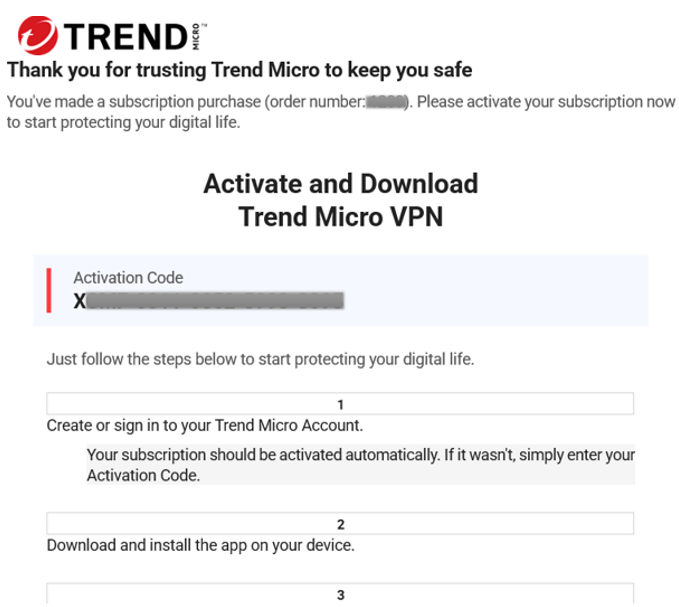
- Email Content:
- Subject: Activate Your Subscription
- Sample Email:
📱 Already Installed on Your Device
- Open Trend Micro.
- Click the expiration date shown on the main screen (lower-right corner).

- The Subscription Information page will open and you'll see your activation code.
For more details, visit our Trend Micro Activation Code guide.
Get Your Activation Code Ready
-
Your Activation Code (20-character alphanumeric code) is required to verify your subscription and get started. Find yours using one of the options below:
Sample format: XXXX-0000-0000-0000-0000
🛒 Purchased from a Retail Store
- Look inside the product packaging for a card or label containing the activation code.
- Some retailers print the code on the purchase receipt.
- Sample format: XXXX-0000-0000-0000-0000
🌐 Purchased from the Trend Micro Website
- Your activation code is sent via a confirmation email (usually within 15 minutes).
- Check Inbox, Spam/Junk folder, Promotions tab (for Gmail users).
- Email Content:
- Subject: Activate Your Subscription
- Sample Email:
📱 Already Installed on Your Device
- Open Trend Micro.
- Click the expiration date shown on the main screen (lower-right corner).
- The Subscription Information page will open and you'll see your activation code.
For more details, visit our Trend Micro Activation Code guide.
Get Your Activation Code Ready
-
Your Activation Code (20-character alphanumeric code) is required to verify your subscription and get started. Find yours using one of the options below:
Sample format: XXXX-0000-0000-0000-0000
🛒 Purchased from a Retail Store
- Look inside the product packaging for a card or label containing the activation code.
- Some retailers print the code on the purchase receipt.
- Sample format: XXXX-0000-0000-0000-0000
🌐 Purchased from the Trend Micro Website
- Your activation code is sent via a confirmation email (usually within 15 minutes).
- Check Inbox, Spam/Junk folder, Promotions tab (for Gmail users).
- Email Content:
- Subject: Activate Your Subscription
- Sample Email:
📱 Already Installed on Your Device
- Open Trend Micro.
- Click the expiration date shown on the main screen (lower-right corner).
- The Subscription Information page will open and you'll see your activation code.
For more details, visit our Trend Micro Activation Code guide.
Enter Your Activation Code
-
🔔 Heads Up: What happens after you click Proceed with Renewal?
➡️
Next page
You'll be redirected to the Checkout page to review your renewal offer.
💳
Payment methods
Credit / Debit Card
PayPal
Google Pay
⏱️
Time to complete
Most renewals are completed in just a few minutes.
🛡️
Charges
✅ You'll see a full summary before any charge is made — no surprises.
Review and Finalize Your Order
-
- Review Available Offers — Browse the renewal and upgrade deals available for your subscription and select the one that best fits your needs.
- Enter Your Email Address — Enter the email address associated with your Trend Micro account. Make sure it's correct — your renewal confirmation will be sent here.
-
Choose Your Payment Method Select your preferred payment option:
- Credit/Debit card
- PayPal
- Google Pay
- Complete Your Payment — Follow the steps based on your chosen payment method:
- Credit/Debit Card: Fill in your payment details, ensuring all fields are completed. Check the box confirming you agree to the terms and charges, then click Next to proceed.
- PayPal: Click the PayPal button. A new window will open where you can log in to your PayPal account and complete your payment.
- Google Pay: Click the GPay button. A new window will open — fill in the required details and click Save Card to complete your payment.
- Follow the Remaining Prompts — Complete any additional on-screen steps to finalize your renewal.
- 🎉 You're All Set! — Once your renewal is complete, a confirmation email will be sent to your registered email address.
Purchased through Best Buy or an ISP
For subscriptions purchased through Best Buy or your Internet Service Provider, please contact their support team to renew your subscription. To contact them:
- For Best Buy purchases, call 1-888-237-8289.
- For subscriptions via an ISP, contact your provider directly.
Purchased through an ISP
For subscriptions purchased through your Internet Service Provider, please contact their support team to renew your subscription.
Helpful Reminders
- Ensure you are using your current activation code.
- Make sure you have a stable internet connection to avoid errors or interruptions.
- Use a valid payment method. Curious about the available payment options? Refer to this article for information: Accepted Payment Methods.
- Can’t find your activation code in your Trend Micro purchase email? Check this article for helpful tips: Missing Activation Code in Trend Micro Purchase Email
- Having trouble renewing your subscription? Please contact our friendly support team for assistance.
See Hotline Numbers